

Medical billing automation uses software to handle the repetitive parts of the revenue cycle, such as eligibility checks, claim scrubbing, claim status follow-up, and payment posting, so billers spend their time on the claims that need judgment. Most practices already automate a little through their practice management system. The difference between a little and a lot shows up in how many claims go out clean, how fast denials get worked, and how many hours staff spend re-keying the same data.
This guide covers what billing automation is, where it pays off first, how to move from manual work to automated workflows, and how to choose software that fits your practice.
Key Takeaways
- Automation works best on high-volume, rule-based tasks like eligibility verification, claim edits, status checks, and remittance posting.
- Start with the step that causes the most rework in your practice, measure it, and expand from there instead of automating everything at once.
- Software handles the rules, but people still have to work complex denials, appeals, and payer disputes.
What is Medical Billing Automation?
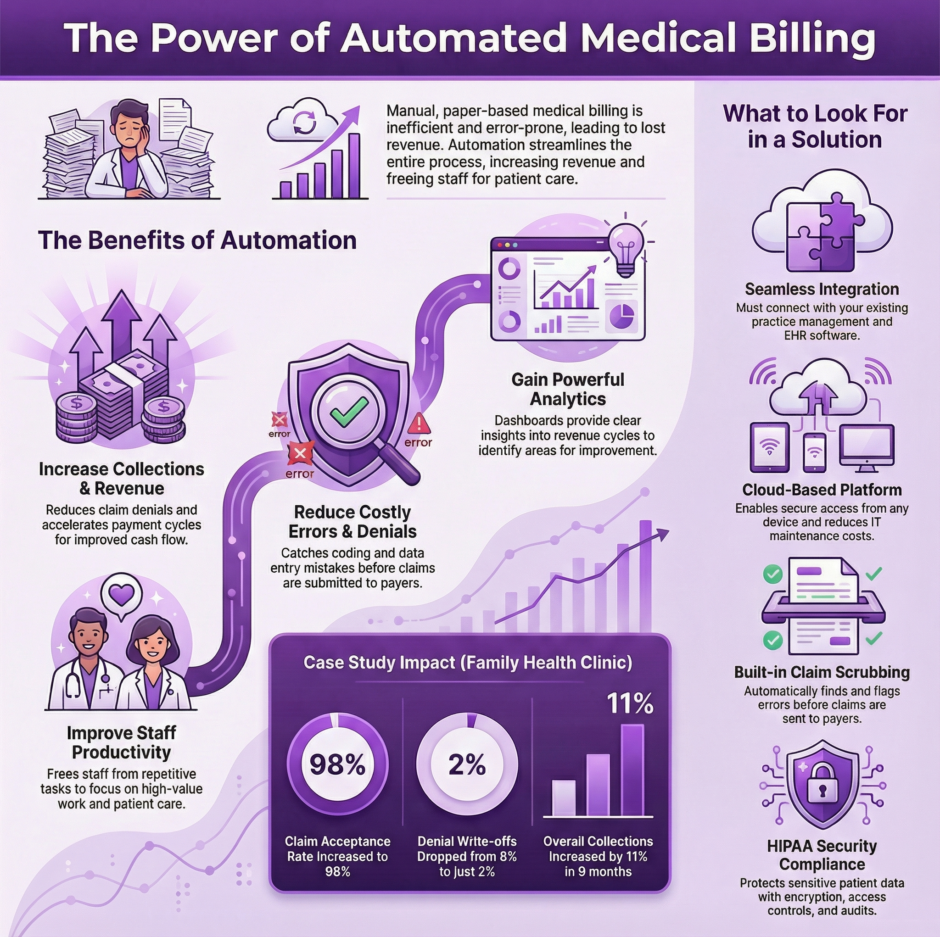
 Medical billing automation is any software that completes a billing task without a person doing it step by step. Some of it is built into practice management and clearinghouse platforms, like batch eligibility checks and claim edits. Some of it uses robotic process automation (RPA), where software bots log into payer portals, pull claim statuses, or download remittances the same way a person would. Newer tools add AI to read documentation, suggest codes, or predict which claims are likely to deny.
The common thread is that each automated task follows a rule. If a patient’s coverage is inactive, flag the appointment. If two codes can’t be billed together, stop the claim before it goes out. If a payment posts short, route it to someone for review.
Key Benefits of Medical Billing Automation
The payoff comes from doing routine work faster and with fewer mistakes.
- Fewer rejections, because claims are checked against payer and coding rules before submission.
- Faster payment, because claims go out the day of service and status checks run daily instead of when someone has time.
- Less data entry, which cuts the typos and transposed numbers that cause registration denials.
- Better visibility, since dashboards show aging, denial trends, and payer turnaround without manual reports.
- Staff time moves from keying data to working the claims that need a person.
Automation doesn’t fix a broken process on its own. If charge capture is inconsistent or front-desk staff skip insurance updates, software just moves the same errors along faster. The practices that get the most from it clean up the workflow first, then automate it.
Which Billing Tasks to Automate First
Every step of the revenue cycle can be automated to some degree, but some steps return far more than others.
Eligibility and benefits verification is usually the best starting point. Automated checks run a day or two before each appointment and flag inactive coverage, changed plans, and missing referrals while there is still time to fix them. Our guide on verifying insurance eligibility and benefits covers what those checks should confirm.
Claim scrubbing comes next. Automated edits catch missing modifiers, invalid diagnosis pairings, and code combinations that NCCI edits don’t allow, so problems like improper bundling get fixed before the payer sees them.
Claim status checks and payment posting follow. Bots or clearinghouse tools can pull status on every open claim each day and post electronic remittances automatically, leaving only exceptions for staff.
Prior authorization tracking is a newer target. Many payers still require portal submissions, but automation can at least track which services need approval and alert staff before an authorization expires.
Transitioning from Manual to Automated Billing
Moving from manual billing to automated workflows works best in stages.
 Map your current process from scheduling to payment and note where claims stall or get reworked.
- Pull baseline numbers, including clean claim rate, days in A/R, and denial rate by reason, so you can measure the change.
- Pick one task with high volume and clear rules, such as eligibility checks, and automate it first.
- Run the new process alongside the old one for a few weeks and compare results before switching over fully.
- Train staff on what the software now handles and what still needs them, especially exception queues.
- Review the numbers monthly and add the next task once the first one is stable.
 Map your current process from scheduling to payment and note where claims stall or get reworked.
Expect some disruption in the first month. Payer enrollment for electronic remittance, new edit rules that flag claims the old process let through, and staff learning new screens all take time to settle.
How to Select the Right Medical Billing Automation Software
Billing automation tools range from features inside your practice management system to standalone RPA platforms.
Compare them on these points.
- Integration with your EHR, practice management system, and clearinghouse without manual file transfers.
- Payer coverage, including whether the tool can reach the portals and payers you bill most.
- Edit libraries that are updated when NCCI, payer policies, and code sets change.
- Reporting that shows denial reasons, aging, and staff productivity in one place.
- Security controls, including encryption, role-based access, audit logs, and a signed business associate agreement.
- Pricing that matches your volume, with clear terms for setup, per-claim fees, and support.
- Vendor support that answers quickly when a payer changes its portal and a bot stops working.
Ask for references from practices in your specialty and a demo using your own claim scenarios, not the vendor’s sample data.
Medical Billing Automation Tips and Tricks
A few habits separate practices that get steady results from those that end up turning automation off.
- Assign an owner for every exception queue so flagged claims don’t sit unworked.
- Review edit rules quarterly and remove ones that flag too many claims without catching real errors.
- Keep an eye on bots after payer portal updates, since a layout change can stop a bot without warning.
- Track denials by root cause, not just by count, and feed the patterns back into your edits.
- Don’t automate a step you can’t explain. If nobody knows why a rule exists, find out before building it into software.
For a wider view of how claims move from submission to payment, see Claims Management 101.
What Automation Still Can’t Do
Software is good at rules and bad at judgment. Complex denials, medical necessity appeals, payer disputes, and coding questions that depend on the documentation still need an experienced biller. So do conversations with patients about balances and with payers about underpayments.
AI tools are closing some of that gap, and the 2026 medical billing trends show where they are headed. For now, the strongest setups pair automation for the routine volume with people who own the exceptions.
Medical Billing Automation FAQ
What is medical billing automation?
Medical billing automation is software that completes billing tasks without manual step-by-step work, including eligibility checks, claim scrubbing, claim status follow-up, and payment posting.
Which billing tasks should a practice automate first?
Most practices start with eligibility and benefits verification, then claim scrubbing, because those steps prevent the registration and coding errors behind many denials.
Is RPA the same as billing automation?
RPA is one type of billing automation. It uses software bots to complete tasks in websites and applications the way a person would, such as checking claim status on a payer portal.
Will automation replace medical billers?
No. Automation handles routine, rule-based work, while billers still handle complex denials, appeals, payer disputes, and coding questions that depend on clinical documentation.
How long does it take to move from manual to automated billing?
It depends on the practice and the tools, but most transitions run in stages, starting with one task, running it alongside the manual process, and adding more once results are stable.
Medwave Pairs Automation With Experienced Billers
Automated eligibility checks and claim edits get claims out clean, and experienced billers handle everything the software flags. Our medical billing team runs both sides of that work, which keeps our clean claim rate at 98%.
Whether you want to add automation to an in-house billing team or hand off the whole revenue cycle, we can show you which steps in your current process would gain the most.
Below, tell us where your claims slow down and we’ll show you which parts of your billing can be automated first.

Co-Founder and COO of Medwave, bringing more than 25 years of hands-on experience in healthcare revenue cycle management, payer contracting, and medical credentialing.