

After years of anticipation, CMS has officially launched PECOS 2.0, a ground-up rebuild of how providers enroll in and maintain Medicare participation. This isn’t a cosmetic redesign, it changes daily workflow for anyone who touches Medicare enrollment, credentialing, or revenue cycle operations.
Understanding what’s actually different in PECOS 2.0 keeps payments flowing and applications out of review purgatory, for a single practitioner’s application and for hundreds of providers across multiple states.
Key Takeaways
CMS has fully launched PECOS 2.0, a rebuilt Medicare enrollment and revalidation system with a redesigned interface, real-time data validation against IRS and NPPES records, and mandatory multi-factor authentication through CMS Identity & Access (I&A) Management. Full migration is expected to be complete by the end of 2026, and an AWS cloud infrastructure migration is scheduled for May 4, 2026. Practices that clean up their provider data now avoid the delays and “Stay of Enrollment” holds that mismatched records are starting to trigger.
What Makes PECOS 2.0 Different from the Legacy System?
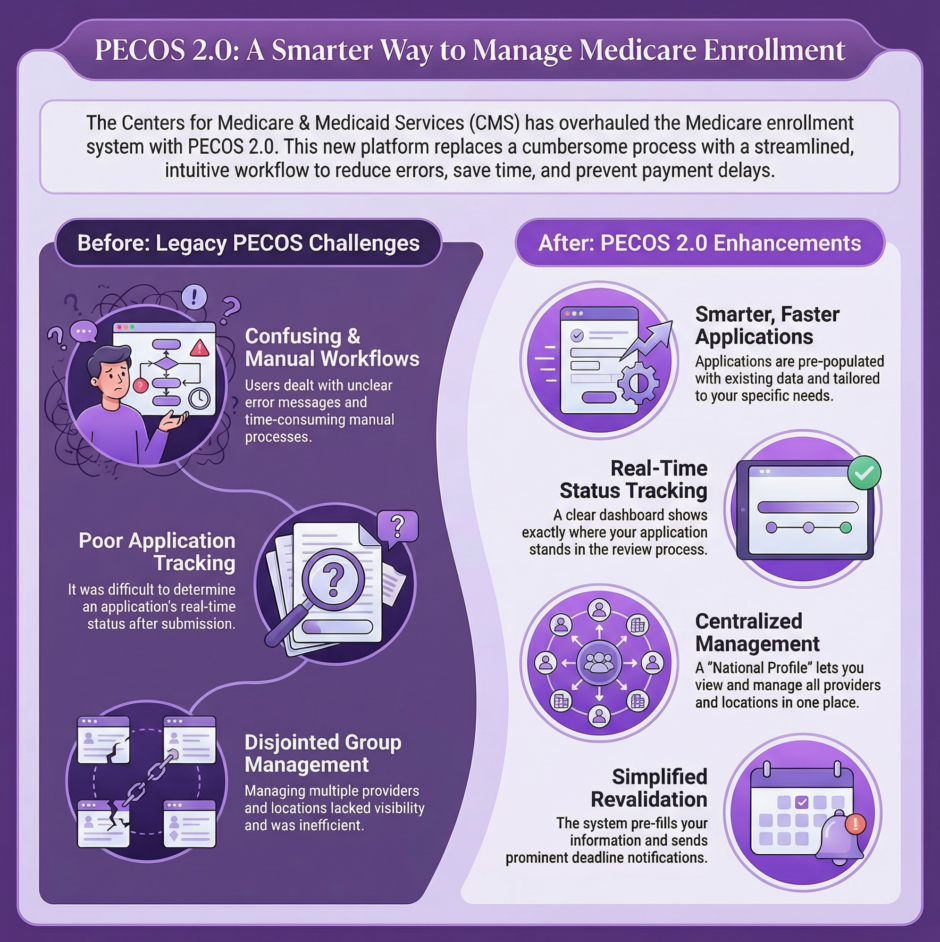
The original PECOS served the healthcare community for years, but it had real limitations. Providers and credentialing specialists dealt with confusing workflows, unclear error messages, and slow manual reviews. CMS built PECOS 2.0 from scratch to fix that.
The new platform walks users through each step of the application, flags missing fields before submission, and shows clearer status tracking. For organizations managing multiple providers, authorized officials and delegated officials now get centralized tools to oversee enrollment activity across the whole organization, with role-based permissions that improve both security and efficiency.
Legacy PECOS vs. PECOS 2.0:
| Feature | Legacy PECOS | PECOS 2.0 |
|---|---|---|
| Login security | Username and password | CMS Identity & Access (I&A) with mandatory MFA |
| Data validation | Manual review, errors caught weeks later | Real-time cross-check against IRS, NPPES, adverse-action data at submission |
| Revalidation | Full re-entry of unchanged information | Pre-populated records, review only what changed |
| Multi-location management | Each location entered from scratch | Copy and modify existing location data from a centralized dashboard |
| Infrastructure | On-premises system | Cloud-based, AWS migration scheduled May 4, 2026 |
What’s New in PECOS 2.0 for 2026?
 A few 2026-specific details matter for anyone enrolling or revalidating right now. Every PECOS 2.0 login now requires registration through CMS Identity & Access (I&A) Management, and multi-factor authentication is mandatory. Organizations must designate an Authorized Official in I&A before anyone on the team can access enrollment records.
The real-time cross-referencing against IRS and NPPES data is catching mismatches the old system never flagged. Small formatting differences like “Suite 204” versus “Ste 204” between your CMS-855 application and your IRS records can now trigger a “Stay of Enrollment” hold on an otherwise clean, long-standing enrollment.
The $750 Medicare enrollment application fee applies to new enrollments, revalidations, and practice location changes. Providers who can’t pay may submit a written hardship exception with supporting documentation, though CMS reviews these case by case and approval isn’t guaranteed.
CMS has also scheduled an AWS cloud infrastructure migration for May 4, 2026. Any organization using IP allowlists to control PECOS access needs to update those network configurations before that date to avoid access disruptions.
How Does the Updated Enrollment Process Work Step by Step?
Starting a new Medicare enrollment in PECOS 2.0 follows a more logical flow than before. When you log in, your dashboard separates active applications, pending revalidations, and completed enrollments into distinct sections, making it easier to prioritize your work.
The application walks you through provider information, practice locations, specialty designations, and supporting documentation in sequence. Each section must be completed before moving forward, which helps prevent incomplete submissions. The system also runs real-time validation checks, alerting you immediately if information doesn’t match CMS records or required fields are missing.
Supporting documentation is simpler too. Instead of uploading files and hoping they’re in the right format, PECOS 2.0 tells you exactly what’s needed, acceptable file types, and maximum file sizes, cutting out much of the guesswork that used to cause delays.
How Do You Manage Group Members and Multiple Practice Locations?
 For practices with multiple providers or locations, PECOS 2.0 introduces new capabilities that were missing from the original system. Authorized officials can manage their entire organization’s enrollment activity through a centralized dashboard, adding providers, reassigning them to different locations, and monitoring pending applications in one place.
Adding locations is now simplified, especially for sole proprietors expanding their footprint. Instead of starting from scratch, you can copy information from an existing location and modify only what’s different, saving time and reducing data entry errors.
Large organizations operating across multiple states benefit from improved state-specific guidance. Delegated officials can also be assigned specific permissions, handling parts of enrollment while sensitive organizational information stays restricted.
What Does the New Revalidation Process Look Like?
Revalidation, confirming and updating your Medicare enrollment information periodically, has gotten real attention in PECOS 2.0. CMS simplified the workflow while keeping the oversight needed to prevent fraud and ensure accurate provider information.
The system now sends more prominent notifications as revalidation deadlines approach, both inside the portal and by email to designated contacts. When you start a revalidation, PECOS 2.0 pre-populates your existing information so you only review and update what’s changed, a real time-saver compared to re-entering everything from scratch.
What Are the Critical Timelines and Deadlines to Know?
 Timing matters. Initial enrollment applications typically take 30 to 90 days to process, depending on completeness and whether issues come up during review. Revalidation cycles generally run every three to five years depending on provider type, though CMS can require revalidation more often for reasons like ownership changes, practice location moves, or billing pattern concerns.
Missing a revalidation deadline has real consequences, your Medicare billing privileges can be deactivated, meaning claim denials and revenue interruption until revalidation is completed and approved. For new providers joining a practice, starting enrollment 90 to 120 days before the intended start date leaves a comfortable buffer for processing and any issues that come up.
How Can You Track Your Applications in PECOS 2.0?
One of the most frustrating parts of the original PECOS was not knowing where an application stood. PECOS 2.0 fixes this with real-time tracking that shows each application’s current stage, under review, pending additional documentation, or approved. If CMS needs more information, the system states exactly what’s required and lets you submit it directly through the portal.
That transparency helps everyone in the process. Credentialing specialists can give providers accurate updates, revenue cycle teams can better forecast when new providers can start billing Medicare, and authorized officials can spot bottlenecks before they become real problems.
How Can You Prevent Application Denials in PECOS 2.0?
 Even with the improvements, applications can still be denied without careful attention to accuracy. The most common causes are mismatched information between PECOS and other federal databases, incomplete documentation, and errors in practice location information.
Before submitting, verify that your National Provider Identifier (NPI) information matches exactly what’s in NPPES. Discrepancies here trigger immediate red flags and can lead to processing delays or denials. Pay close attention to practice location information too, the address must match official records, and each location a provider works from needs to be properly documented and approved for billing privileges there.
Documentation requirements vary by provider type and enrollment category, so reviewing CMS guidance specific to your situation before starting helps you gather everything upfront.
Who Needs to Know PECOS 2.0?
The reach of PECOS 2.0 extends across the organization. Credentialing and enrollment specialists need deep familiarity since it’s the primary tool they use daily, but the impact goes well beyond those roles.
Revenue cycle managers and directors need to understand how PECOS 2.0 affects cash flow timelines and provider activation. Billing teams need to know when new providers are approved and active so they can start submitting claims. Practice and clinic owners should stay informed about their organization’s enrollment status and any issues that come up.
Hospital leadership, authorized officials, and delegated officials are responsible for keeping the organization’s Medicare enrollment status current, overseeing enrollment for employed physicians, managing location updates, and tracking revalidation deadlines across potentially hundreds of providers. Front desk staff and scheduling teams benefit too, since they field patient questions about provider Medicare participation.
PECOS 2.0 FAQ
Is PECOS 2.0 mandatory for all Medicare providers?
Yes. PECOS 2.0 is now the system of record for all Medicare enrollment submissions. CMS is rolling out migration in phases, with full migration expected by the end of 2026, but new applications, revalidations, and changes of information all go through PECOS 2.0.
Do I need a new NPI to use PECOS 2.0?
No. Your existing National Provider Identifier carries over. What matters is that your NPPES record matches your PECOS 2.0 data exactly, since the system now cross-references the two in real time.
What happens if my data doesn’t match between PECOS and NPPES?
A mismatch, even a minor formatting difference in an address, can trigger a “Stay of Enrollment” hold that pauses billing privileges until the discrepancy is resolved.
How much does it cost to enroll or revalidate through PECOS 2.0?
CMS charges a $750 application fee for new enrollments, revalidations, and practice location changes. Providers facing financial hardship can request an exception with supporting documentation, reviewed case by case.
How often do I need to revalidate through PECOS 2.0?
Most provider types revalidate every three to five years, though CMS can require it more often for reasons like ownership changes, location moves, or billing pattern concerns.
What does PECOS stand for?
Provider Enrollment, Chain, and Ownership System, the CMS platform providers use to enroll in and maintain Medicare participation.
Is PECOS the same thing as CMS-855 forms?
No. The CMS-855 forms are the applications; PECOS 2.0 is the online portal where those applications are submitted, tracked, and updated.
Who can sign a PECOS 2.0 application electronically?
Only an authorized official assigned through CMS Identity & Access (I&A) Management, and the electronic signature must match that person’s assigned role and credentials.
What is a “Stay of Enrollment” in PECOS 2.0?
A hold CMS places on an enrollment when it detects a data mismatch between PECOS and another federal database like NPPES or IRS records, pausing billing privileges until it’s resolved.
Do I need multi-factor authentication to log into PECOS 2.0?
Yes. MFA through CMS Identity & Access (I&A) Management is required for every PECOS 2.0 login as of 2026.
Why Partner with a Credentialing Expert?
 Given the stakes, payment delays, loss of Medicare participation, revenue interruption, many healthcare organizations choose to partner with specialists who work with Medicare enrollment daily. This is where companies like Medwave come in. With expertise in medical billing, credentialing, and payer contracting, Medwave helps healthcare providers maintain smooth enrollment processes while freeing up internal staff to focus on patient care.
The shift to PECOS 2.0 represents both a challenge and an opportunity. Organizations that get ahead of the new system experience smoother enrollments, fewer denials, and better oversight of Medicare participation. Those that fall behind risk payment interruptions and administrative headaches, especially with the I&A/MFA requirements, the real-time data checks, and the May 2026 AWS migration all landing in the same year.
Taking time now to learn PECOS 2.0, clean up provider data, and set clear internal processes pays dividends in uninterrupted Medicare participation and revenue flow. As your practice works through these changes, Medwave’s medical billing, credentialing, and payer contracting teams are here to help keep enrollment, revalidation, and billing privileges on track.

Co-Founder and COO of Medwave, bringing more than 25 years of hands-on experience in healthcare revenue cycle management, payer contracting, and medical credentialing.