

Medical credentialing can make or break a practice’s ability to serve patients and collect payments. The right workflow streamlines the entire process, cutting approval times from months to weeks while reducing errors that cause frustrating delays. Let’s explore the best credentialing workflows and how to implement them in your practice.
What Makes a Credentialing Workflow Effective?
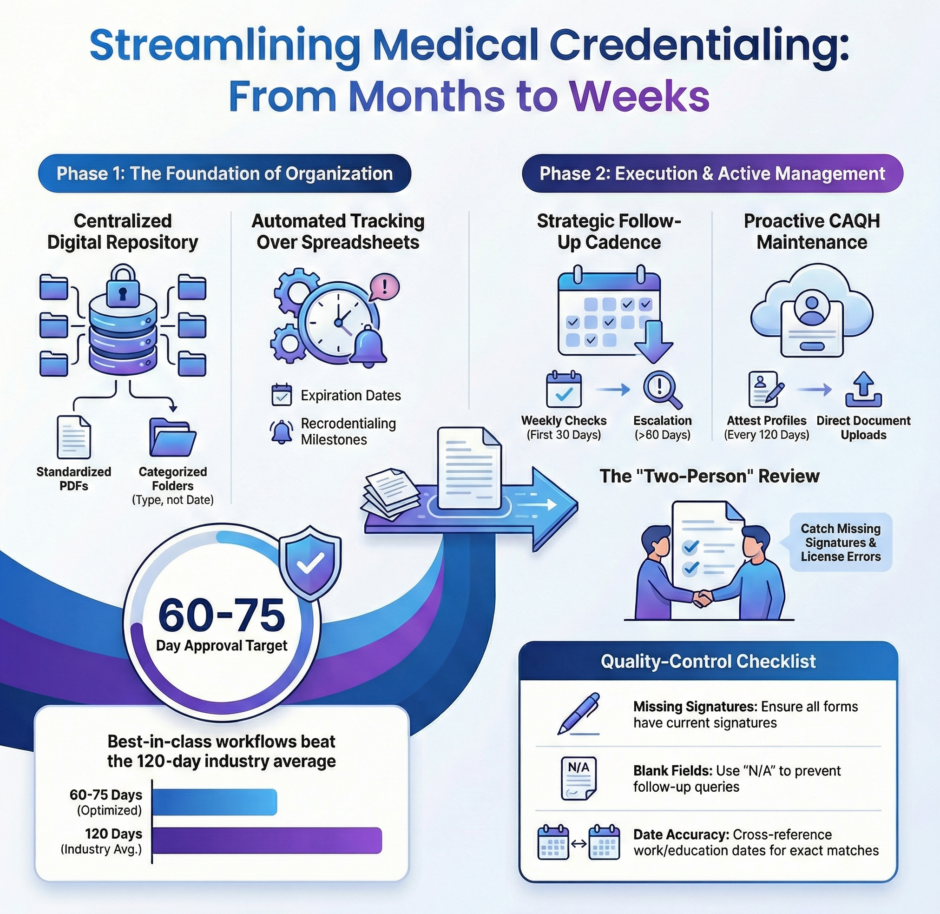
 An effective credentialing workflow combines organization, automation, and proactive communication. The best workflows don’t just move paperwork from point A to point B, they anticipate problems, prevent errors, and keep every stakeholder informed throughout the process.
The foundation starts with clear documentation standards. Every provider needs the same core documents. Medical license, DEA registration, board certifications, malpractice insurance, work history, and education credentials. Having a standard checklist ensures nothing gets overlooked when gathering initial materials.
Automation plays a crucial role in modern credentialing workflows. Manual tracking with spreadsheets leads to missed deadlines and lost paperwork. Credentialing software or databases track application status, store documents securely, and send automated reminders when certifications approach expiration dates.
Communication protocols keep the process moving forward. Regular check-ins with credentialing departments, documented follow-up schedules, and escalation procedures for delayed applications prevent applications from sitting idle on someone’s desk for weeks.
How Should You Organize Provider Documentation?
Start by creating a centralized document repository for each provider. This digital folder should contain every credential document in a standardized format, typically PDF files that payers and hospitals can easily review.
Organize documents by category rather than by date received. Create subfolders for licenses, certifications, insurance policies, education records, and work history. This structure makes it easy to locate specific documents when credentialing departments request additional information.
Implement version control for documents that get updated regularly. When a provider renews their medical license or malpractice insurance, keep both the old and new versions with clear date labels. This creates an audit trail and prevents confusion about which version was submitted to which payer.
Use consistent naming conventions for all files. A good format includes the provider’s name, document type, and expiration date. For example: “Smith_John_MD_License_CA_exp_12-2025.pdf” immediately tells you what the document contains and when it expires.
What’s the Best Way to Track Application Status?
 The best tracking systems provide visibility into every application’s current status and next required action.
Whether you use specialized credentialing software or a detailed spreadsheet, your tracking system should answer these questions instantly. Which applications are pending? Who’s waiting on whom? What’s the next step?
Create status categories that reflect the actual stages of credentialing. Document Gathering, Application Submitted, Under Review, Additional Information Requested, Committee Review Pending, and Approved. Each category should have a target timeline so you can identify applications that are moving too slowly.
Set up automated alerts for critical milestones. When an application has been under review for 60 days, the system should flag it for follow-up.
Track multiple data points for each application. Submission date, payer name, application type (initial vs. recredentialing), assigned staff member, current status, last contact date, and projected completion date. This information helps identify bottlenecks and measure team performance.
How Often Should You Follow Up with Payers?
Follow-up frequency depends on how long an application has been pending. For the first 30 days after submission, weekly check-ins are appropriate. This catches any immediate issues like missing documents or incomplete sections that would otherwise delay processing.
Between 30 and 60 days, bi-weekly follow-ups maintain momentum without becoming annoying.
Beyond 60 days, escalate to weekly contact again. Applications pending longer than standard processing times deserve increased attention. At this point, you should also escalate to supervisors or managers within the credentialing department who have authority to expedite reviews.
Document every interaction with payers. Note the date, person contacted, information discussed, and any commitments made. This record proves valuable when applications drag on too long and you need to escalate to contract managers or provider relations teams.
What Information Should You Prepare in Advance?
Smart credentialing teams prepare standardized responses to common requests before applications are even submitted.
Create a master file with detailed answers to these frequently requested items:
- Work History Explanations – If a provider has employment gaps, brief practice ownership, or frequent job changes, prepare clear explanations in advance. Credentialing committees want to understand anything that looks unusual in a work history.
- Malpractice Claims Disclosure – Any malpractice history requires detailed explanation. Prepare narratives that describe the claim, its resolution, and lessons learned. Being proactive and thorough here prevents delays caused by committee concerns.
- License Action History – Even minor license actions like late renewal fees need explanation. Document the circumstances, resolution, and current status clearly to avoid misunderstandings.
- Board Certification Timeline – For providers who completed residency recently or are pursuing subspecialty certification, explain their certification timeline and current status clearly.
Having these explanations ready means you can respond to credentialing questions within hours instead of days, dramatically reducing overall approval time.
How Do You Handle Recredentialing Efficiently?
 Recredentialing happens every 2-3 years, and the best workflows start preparing 120 days before credentials expire.
Set up automated reminders that alert you when recredentialing deadlines approach. Create a recredentialing calendar that shows every provider’s renewal dates across all payers. This birds-eye view prevents last-minute scrambles and helps distribute workload evenly throughout the year rather than having everything due simultaneously.
For recredentialing, focus on what’s changed since initial credentialing. Update work history, confirm current licenses and certifications, obtain new malpractice insurance certificates, and verify DEA registration remains valid.
Many payers offer online portals for recredentialing that pre-populate information from your previous application. Use these portals when available, they’re faster than paper applications and reduce data entry errors.
Submit recredentialing applications 90 days before current credentials expire. This buffer prevents coverage gaps if processing takes longer than expected.
What Role Does CAQH ProView Play?
CAQH ProView serves as the universal credentialing database that most payers access for provider information.
Maintaining an accurate, current CAQH profile is one of the most important credentialing workflow steps. Update CAQH profiles immediately when anything changes, new license, updated malpractice insurance, additional board certification, or new practice location. Many credentialing delays happen because payers pull outdated information from CAQH and then request updated documents.
Attest your CAQH profile every 120 days as required. Set recurring calendar reminders so attestation never lapses.
Use CAQH’s document upload feature to store all supporting documents directly in your profile. When payers access your CAQH data, they can view these documents immediately without requesting them separately, speeding up their review process.
Medwave can create or update CAQH ProView accounts for you.
How Do You Prevent Common Credentialing Errors?
The most common credentialing errors are completely preventable with proper quality control checks.
Before submitting any application, run through this checklist:
- Verify all dates are accurate – Incorrect dates on work history, education, or certifications raise red flags and trigger verification requests that delay approval.
- Confirm signatures are present and current – Missing or outdated signatures on application forms or attestations are the number one reason applications get returned unprocessed.
- Check license numbers match exactly – Transposed digits in license numbers force payers to verify information manually, adding weeks to processing time.
- Ensure addresses are complete and current – Missing suite numbers or outdated addresses cause correspondence to go to the wrong location, creating delays you don’t even know about.
- Review for blank fields – Any blank field on an application triggers follow-up questions, even if that field doesn’t apply to the provider. Write “N/A” instead of leaving fields blank.
Implement a two-person review process where one person completes the application and another reviews it before submission.
What Technology Improves Credentialing Workflows?
 Modern credentialing workflows leverage technology at every stage. Credentialing management software centralizes documents, tracks applications, and automates reminders.
Digital document management systems store credentials securely in the cloud with controlled access. Authorized staff can retrieve any document within seconds, whether they’re in the office or working remotely. Version control ensures everyone accesses the most current documents.
Electronic signature platforms speed up the application process by eliminating the need to print, sign, scan, and email documents.
Automated email systems send scheduled follow-ups to credentialing departments without manual intervention. Set the system to send status inquiries at predetermined intervals, ensuring consistent communication without requiring staff time.
Calendar integration keeps renewal dates visible and triggers preparation workflows at appropriate times. Integration with your practice management system ensures billing staff know exactly when provider credentials are active so claims get submitted to the right payers.
How Do You Prioritize Multiple Credentialing Applications?
When managing credentialing for multiple providers, prioritization ensures the most important applications get attention first.
Start with providers who are already seeing patients but need recredentialing to maintain uninterrupted panel membership. Coverage gaps affect patient access and practice revenue immediately.
Next, prioritize new providers whose start dates are approaching. These applications have hard deadlines that affect hiring commitments and practice capacity.
Applications for payers who represent large patient volumes deserve higher priority than those with minimal patient impact. If 30% of your patients have Blue Cross insurance, that credentialing application takes precedence over a payer that covers 2% of your patient base.
Geographic considerations also matter. If you’re opening a new office location, credentialing providers for that location should take priority to ensure the facility can serve patients from day one.
What Metrics Should You Track?
Measuring credentialing workflow performance helps identify improvement opportunities and demonstrates value to practice leadership.
Track these key metrics:
- Average Time to Initial Credentialing – Measure from application submission to final approval. Industry benchmarks range from 90 to 120 days, but best-in-class workflows achieve 60-75 days.
- Recredentialing Completion Rate – What percentage of recredentialing applications complete before current credentials expire? Target 100% completion with zero coverage gaps.
- Application Error Rate – How many applications get returned due to errors or missing information? Track this by staff member to identify training needs.
- Follow-Up Response Time – When payers request additional information, how quickly does your team respond? Measure in business hours rather than days to emphasize urgency.
- Payer Processing Time – Track how long each payer takes to process applications. This data helps set realistic expectations and identifies payers whose processing times consistently exceed norms.
Review these metrics monthly to spot trends and celebrate improvements.
How Can Outsourcing Improve Credentialing Workflows?
 Many practices outsource credentialing to specialized companies that handle this work full-time.
At Medwave, we provide credentialing services alongside medical billing and payer contracting, creating an integrated approach to revenue cycle management.
Outsourced credentialing brings several workflow advantages. Specialized credentialing teams have established relationships with payer credentialing departments, often knowing exactly who to contact to check on application status or resolve issues. This insider knowledge speeds up processing significantly.
Expert credentialing services maintain current knowledge of each payer’s specific requirements, forms, and preferred submission methods. This expertise reduces errors and rejections that happen when practices try to manage credentialing internally while juggling clinical operations.
Scalability is another benefit. When you hire multiple providers simultaneously, outsourced credentialing teams can handle the increased workload without missing deadlines.
Technology investments make more sense for specialized credentialing companies who spread costs across many clients. These companies use enterprise credentialing platforms that would be cost-prohibitive for individual practices to purchase and maintain.
The best credentialing workflows combine clear processes, smart technology, proactive communication, and expert knowledge. Implementing these workflow best practices reduces delays, prevents errors, and ensures providers can serve patients without unnecessary administrative obstacles. Strong credentialing workflows protect practice revenue, support provider satisfaction, and ultimately improve patient access to care.