

Missing a single payer requirement update can delay your provider enrollment by weeks or even months. For a busy clinic, that translates directly into lost revenue and frustrated patients who can’t access care. The problem? Insurance companies change their enrollment requirements regularly, and keeping up with these updates feels like a full-time job.
If you’re a practice administrator or clinic manager, you already know the headache. One day Medicare updates their documentation requirements. The next week, Blue Cross changes their application process. By month’s end, three more commercial payers have rolled out new forms. It’s exhausting, but staying current isn’t optional. Your clinic’s financial health depends on it.
The good news is that you don’t have to figure this out alone. Healthcare practices across the country have developed proven systems for tracking payer changes without burning out their staff. This guide walks through seven practical strategies that work for clinics of all sizes, from solo practitioners to multi-location groups.
Why Payer Requirements Change So Often
 Before we dive into solutions, let’s talk about why this happens in the first place. Insurance companies don’t change requirements just to make your life difficult. Several forces drive these constant updates.
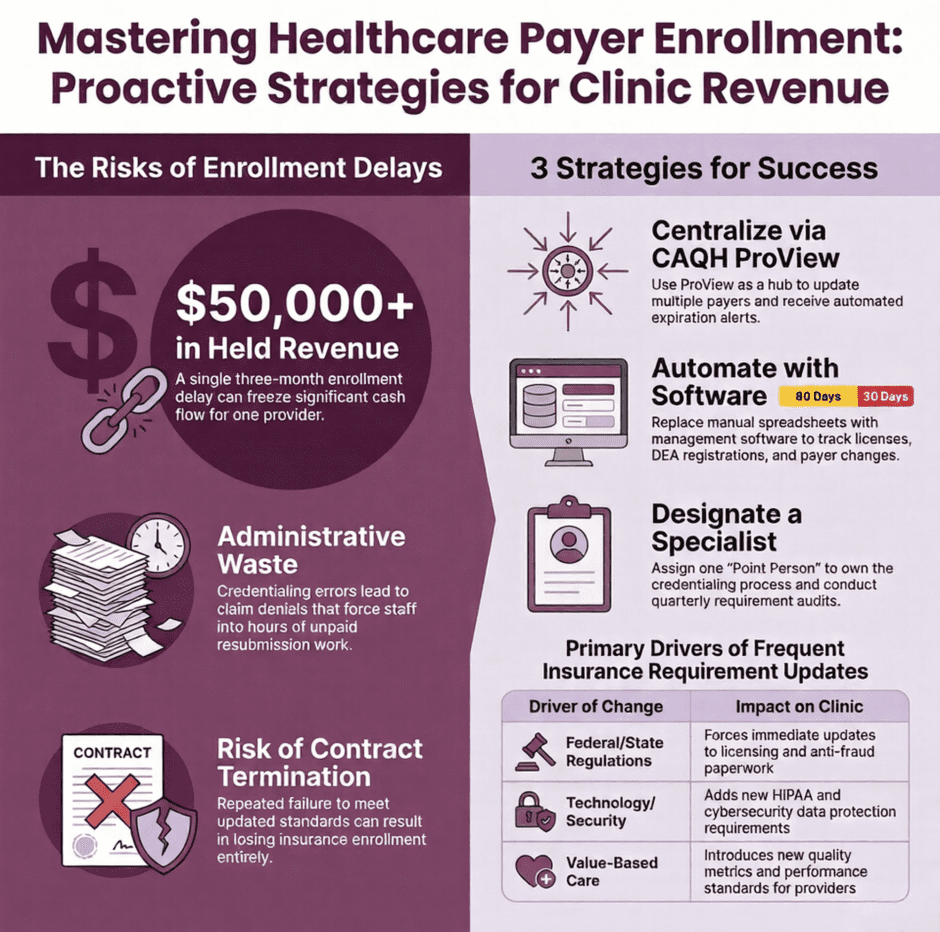
Federal and state regulations shift regularly. When CMS introduces new Medicare rules, private payers often follow suit. State medical boards update licensing requirements. Anti-fraud measures become more strict. Each regulatory change creates a ripple effect that impacts your enrollment paperwork.
Technology plays a role too. As electronic health records and data security standards advance, payers add new requirements to protect patient information. The push toward value-based care has introduced quality metrics and performance standards that didn’t exist five years ago.
Insurance companies also learn from experience. When fraud occurs, they tighten verification processes. When claim denials spike due to credentialing errors, they modify their application systems. These adjustments protect the payer, but they create more work for your clinic.
The bottom line? Requirement changes aren’t slowing down. Your clinic needs a sustainable system for staying informed.
Seven Practical Strategies for Tracking Payer Updates
1. Sign Up for Direct Payer Communications
This sounds obvious, but many clinics miss this crucial first step. Every insurance company you work with maintains a provider portal. These portals send email notifications when requirements change. The problem is someone needs to actively monitor these accounts.
Start by creating a master list of all payers your clinic is enrolled with. For each one, set up a provider portal account if you haven’t already. Use a dedicated email address for credentialing communications rather than someone’s personal work email. When that person leaves, you don’t want to lose access to critical updates.
Most payers also publish provider bulletins and newsletters. Subscribe to all of them. Yes, you’ll get more emails, but a five-minute weekly review beats scrambling when you discover a missed update during a recredentialing deadline.
2. Use CAQH ProView as Your Central Hub
The Council for Affordable Quality Healthcare (CAQH) operates Provider Data Portal (formerly ProView), a centralized database that many payers use for credentialing. Instead of submitting the same information to dozens of insurance companies separately, you maintain one profile that multiple payers can access.
But ProView offers another major benefit. The system sends alerts when your information is about to expire. It also notifies you when payers request additional documentation or when they’ve updated their requirements.
Keep your CAQH profile updated at all times. Set calendar reminders to review it monthly. When you receive an alert, respond immediately. Delays in updating your ProView profile cascade into delays with multiple insurance companies at once.
3. Invest in Credentialing Management Software
Spreadsheets work until they don’t. As your provider roster grows and you work with more payers, manual tracking becomes unmanageable. Credentialing management software automates much of this burden.
These platforms monitor expiration dates for licenses, certifications, malpractice insurance, and DEA registrations. They send alerts weeks before deadlines, giving you time to gather renewals. Many systems also track payer-specific requirements and flag when individual insurance companies make changes.
Quality software integrates with your practice management system, automatically updating provider information across platforms. This eliminates duplicate data entry and reduces errors. While software requires investment, the time saved and revenue protected typically justify the cost within months.
4. Join Professional Credentialing Organizations
Organizations like the National Association Medical Staff Services (NAMSS) exist specifically to help credentialing professionals stay informed. Members receive regular updates about regulatory changes, payer requirement modifications, and industry best practices.
Your state medical association is another valuable resource. These groups track state-specific licensing changes and insurance regulations that affect practices in your area. Many offer free webinars and training sessions on credentialing topics.
Don’t overlook specialty-specific organizations either. If you run a pediatric clinic, dermatology practice, or behavioral health center, associations focused on your specialty often provide targeted credentialing guidance relevant to your providers.
5. Designate a Credentialing Point Person
Clinics that treat credentialing as “everyone’s responsibility” often find that it becomes no one’s priority. Assigning one person or a small team to own this function creates accountability and builds expertise.
Your credentialing specialist doesn’t need to do everything alone, but they should serve as the central coordinator. This person tracks deadlines, monitors payer updates, ensures documents are current, and coordinates with providers to gather needed materials.
Consider certification programs like Certified Provider Credentialing Specialist (CPCS) for whoever fills this role. The investment in training pays dividends through fewer errors, faster processing, and better relationships with insurance company credentialing departments.
6. Schedule Regular Requirement Audits
Don’t wait for a problem to force a review. Establish quarterly audits of your payer requirements and provider credentials. During these audits, check that your information matches each payer’s current standards.
Create a checklist that includes:
- Current licenses for all states where you’re enrolled
- Active malpractice insurance meeting each payer’s minimum coverage
- DEA registrations with correct expiration dates
- Board certifications and required continuing education
- Completed application forms matching the latest payer versions
- Background checks and any screening requirements
- Hospital privileges documentation if applicable
Catching discrepancies during a scheduled audit is far less stressful than discovering them when a payer denies claims or delays recredentialing.
7. Build Relationships With Payer Representatives
Your insurance company contacts are human beings who want to help providers succeed. When you reach the same credentialing specialist repeatedly, you develop a working relationship. These contacts become invaluable when you need clarification on new requirements or help expediting an urgent enrollment.
Save contact information for credentialing representatives at each of your major payers. When new requirements roll out, don’t hesitate to call and ask questions. Most reps appreciate proactive providers who care about compliance. They’re often willing to provide advance notice of upcoming changes or guidance on preparing for new standards.
Document every conversation with payer representatives. Note the date, who you spoke with, what was discussed, and any commitments made. This documentation protects you if questions arise later about whether you received proper notification of a change.
Creating Your Own Tracking System
 Even with software and outside resources, you need an internal system that works for your clinic’s specific situation. Start simple and build complexity only as needed.
Begin with a centralized database or spreadsheet listing every provider at your clinic and every payer you’re enrolled with. For each provider-payer combination, track enrollment dates, recredentialing deadlines, and required documents. Color-code expiration dates so items due within 90 days appear in yellow and items due within 30 days show in red.
Schedule weekly reviews of this tracking system. During each review, check for new alerts from payers, verify that pending items are progressing, and identify any approaching deadlines that need attention.
Set up a shared folder system where all credentialing documents live. Organize it logically so anyone on your team can quickly find a specific license, certificate, or application. Cloud-based storage ensures access from anywhere and provides backup protection.
Train multiple staff members on your tracking system. When your primary credentialing person goes on vacation or leaves the organization, someone else should be able to step in without missing critical deadlines.
Common Requirement Changes to Watch For
Certain types of payer requirement changes occur more frequently than others. Keeping these categories on your radar helps you anticipate updates.
Documentation standards shift regularly. A payer might start requiring notarized signatures where simple signatures worked before. They might demand electronic submissions only, eliminating paper applications. Form versions change, making your saved templates obsolete overnight.
Security and technology requirements keep evolving. HIPAA compliance standards become more detailed. Cybersecurity protocols expand. Data breach notification procedures get added to credentialing applications. Telehealth credentialing emerged as a major category just in recent years, with requirements varying widely by payer.
Value-based care initiatives drive many recent changes. Payers increasingly ask about quality metrics, patient satisfaction scores, and outcomes data during credentialing. They want to know about your participation in quality reporting programs like MIPS. These requirements reflect the industry’s shift away from pure fee-for-service reimbursement.
Background check and screening procedures continue to intensify. What once meant a simple license verification now often includes detailed employment history, education verification, criminal background checks, and sanctions screening against federal databases.
The Real Cost of Falling Behind
When clinics fail to track payer requirement changes, the consequences extend beyond inconvenience. The financial impact can be significant.
Delayed enrollments mean providers can’t bill for services they’ve already delivered. A three-month enrollment delay might represent $50,000 or more in held revenue for a single provider. Multiply that across multiple providers or payers, and you’re looking at cash flow problems that threaten your operation.
Claim denials due to credentialing issues create administrative waste. Your billing staff spends hours following up on denied claims, resubmitting them, and explaining situations to frustrated patients. These hours could be spent on productive work that actually generates revenue.
In extreme cases, falling behind on credentialing compliance can lead to contract termination. Payers expect providers to meet their standards. Repeated failures to maintain current credentials or respond to requirement changes can result in losing your enrollment entirely. Regaining enrollment after termination is exponentially harder than maintaining it in the first place.
How Medwave Can Help
 Managing payer enrollment requirements alongside running your clinic is challenging. You became a healthcare provider to treat patients, not to wrestle with insurance company paperwork. That’s where specialized support makes a difference.
Medwave offers credentialing services as part of our broader revenue cycle management solutions. Our team monitors payer requirement changes across all major insurance companies so you don’t have to. We track your provider credentials, send alerts before expirations, and handle the application and recredentialing process from start to finish.
Our clients tell us that outsourced credentialing gives them peace of mind. They know experts are monitoring requirements, meeting deadlines, and maintaining compliance while they focus on patient care. For many practices, this arrangement makes more financial sense than hiring dedicated in-house staff.