

Staying on top of enrollment requirements is essential for keeping a medical practice running smoothly. PECOS has become the backbone of Medicare enrollment, replacing outdated paper processes with a streamlined digital system. Beyond just being a requirement, PECOS offers real advantages that can save you time, reduce headaches, and protect your practice. Below, we document the seven key benefits of PECOS and show you how this system can make your administrative tasks easier while helping you get paid faster for the care you provide.
What Exactly is PECOS?
 PECOS stands for Provider Enrollment, Chain, and Ownership System. Think of it as Medicare’s digital front door. This online platform, managed by the Centers for Medicare & Medicaid Services (CMS), handles all the enrollment tasks for healthcare providers and suppliers who want to bill Medicare for their services. It replaced the old paper-based enrollment process, making things faster and more secure.
The system came about because of the Patient Protection and Affordable Care Act, which made enrollment mandatory for any provider who orders or refers healthcare services or supplies for Medicare patients. Today, PECOS serves as the central hub where providers submit their information, update their details, track their application status, and maintain their Medicare enrollment.
Why Was PECOS Created in the First Place?
Before PECOS, enrolling in Medicare meant filling out paper forms, mailing them in, and waiting weeks or even months for processing. The manual system was slow, prone to errors, and made it difficult for CMS to track provider information accurately.
The federal government needed a better way to manage the millions of healthcare providers serving over 63 million Medicare beneficiaries. PECOS was designed to speed up enrollment, reduce paperwork, improve data accuracy, and help prevent fraud and abuse in the Medicare program. By moving everything online, CMS created a more efficient system that benefits both providers and patients.
What Are the Main Benefits of Using PECOS?
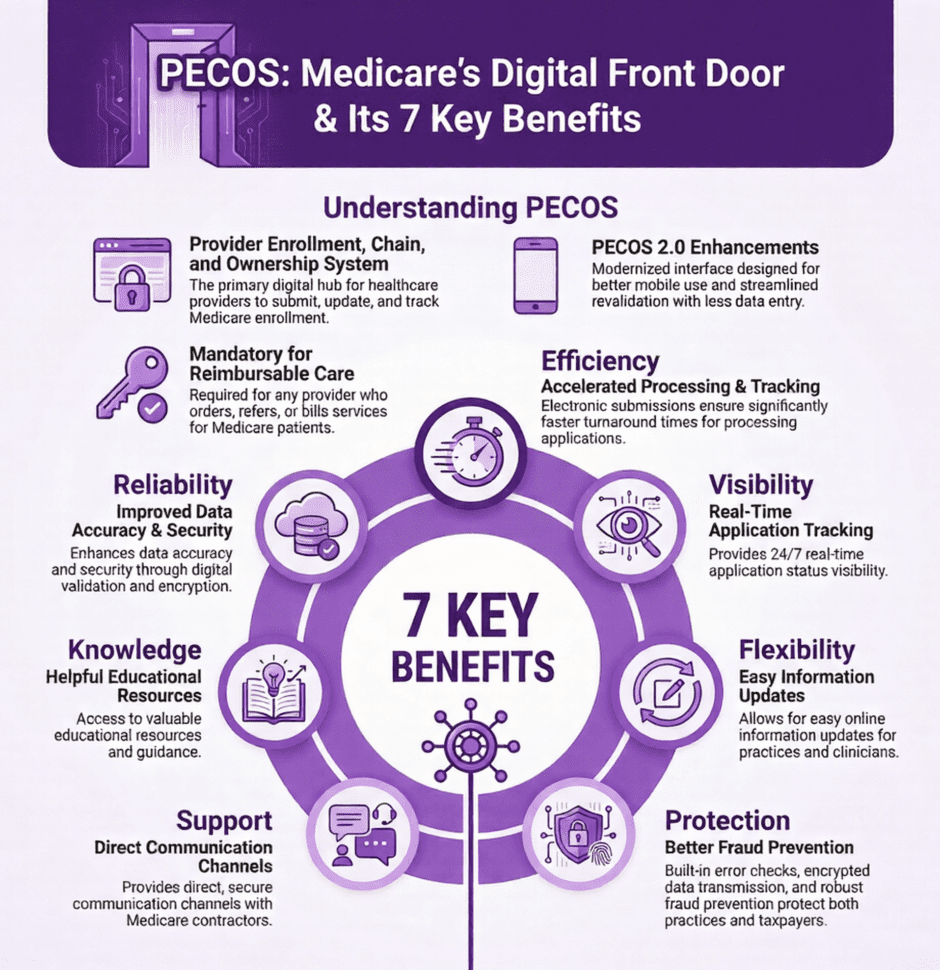
1. Faster Processing Times
Remember the days of waiting forever for paper applications to process? Those days are gone. PECOS processes enrollment applications electronically, which means significantly faster turnaround times compared to the old mail-in method. Instead of waiting weeks or months, providers can often get approved much more quickly. This matters because the sooner you’re enrolled, the sooner you can start billing Medicare and getting paid for the services you provide. For new practices or newly hired providers, this speed can make a real difference in cash flow.
2. Real-Time Application Tracking
One of the most frustrating parts of any application process is not knowing where you stand. PECOS solves this problem by giving you real-time visibility into your enrollment status. You can log in anytime to check where your application is in the process, see if CMS needs any additional information, and identify potential issues before they cause delays. This self-service capability puts you in control and helps you stay on top of your enrollment without having to call and wait on hold with Medicare contractors.
3. Easy Information Updates
Things change in healthcare practices all the time. Maybe you’ve moved to a new office location, changed your practice ownership structure, or need to update your billing information. With PECOS, you can make these changes quickly and easily online. You don’t have to fill out new paper forms or start from scratch. The system lets you modify your existing information whenever needed, which helps ensure your Medicare records stay current and accurate. This is important because outdated information can lead to payment delays or claim denials.
4. Better Fraud Prevention
Medicare fraud costs taxpayers billions of dollars every year. PECOS plays a key role in fighting this problem by maintaining an accurate, regularly updated database of all enrolled providers. The system helps CMS verify that providers are who they say they are, track ownership and control of healthcare organizations, and spot potentially fraudulent activity before it becomes a bigger problem. By requiring all providers to enroll and regularly revalidate their information, PECOS creates a more secure Medicare program that protects both patients and taxpayers.
5. Direct Communication Channels
Need to ask Medicare a question about your enrollment? PECOS provides secure channels for providers to communicate directly with Medicare contractors. This direct access reduces administrative headaches and helps you get answers faster. Whether you need clarification on enrollment requirements, want to check on a pending application, or need to resolve an issue, PECOS makes it easier to connect with the right people at CMS. No more phone tag or unclear instructions.
6. Helpful Educational Resources
Medicare rules and policies can be confusing, and they change regularly. PECOS offers a wealth of educational materials to help providers stay informed. You’ll find step-by-step video tutorials for initial enrollment, webinars on best practices, training modules on how to use the system, and documentation explaining Medicare policies and procedures. These resources are especially valuable for new providers who are enrolling for the first time or staff members who need to learn how to manage PECOS for their practice.
7. Improved Data Accuracy and Security
Paper applications are easy to lose, can be filled out incorrectly, and don’t offer much security for sensitive information. PECOS addresses all these concerns with a secure electronic system that includes built-in error checks, data validation before submission, encrypted transmission of sensitive information, and secure storage of provider records. The system catches common mistakes before you submit your application, which reduces the chance of delays or denials. Plus, you can feel confident that your personal and practice information is protected.
Who Needs to Enroll in PECOS?
Not everyone in healthcare needs a PECOS enrollment, but the list of who does is pretty extensive.
Here’s who must register:
- Physicians in all specialties
- Nurse practitioners and physician assistants
- Physical therapists and occupational therapists
- Clinical social workers and psychologists
- Registered dietitians and certified nurse midwives
- Durable medical equipment suppliers
- Home health agencies
- Hospitals and outpatient facilities
- Any provider who orders or refers services for Medicare patients
Even if you don’t bill Medicare directly, you may still need to enroll. For example, as of 2024, physicians who certify or recertify hospice services must be enrolled in PECOS, even if they never submit a Medicare claim themselves.
How Do You Actually Enroll?
 The enrollment process is straightforward once you know the steps. First off, you’ll need to create an account in the Identity and Access Management System, which gives you access to PECOS and related systems. Then, gather all the required information and documents before you start your application.
You’ll need your National Provider Identifier (NPI) number, state license information, educational credentials, practice location details, ownership and control information, and documentation for electronic funds transfer so Medicare can pay you directly. If you’ve had any legal issues like license suspensions or criminal convictions in the past ten years, you’ll need to disclose those too.
Once you have everything ready, log into PECOS and start your application. The system provides video tutorials and step-by-step guidance to walk you through the process. You can save your progress and come back later if you need to, which is helpful since gathering all the required information can take some time.
What Happens After You’re Enrolled?
Getting enrolled in PECOS isn’t a one-time thing. CMS requires providers to revalidate their enrollment every three to five years to confirm their information is still accurate and current. You’ll receive notifications when your revalidation is due, and you can complete the process through PECOS.
You also need to report certain changes within specific timeframes. Major changes like ownership changes, new practice locations, or license suspensions must be reported within 30 days. Other updates can be submitted within 90 days. Keeping your information current is important because outdated details can lead to claim denials and payment delays.
What If You Don’t Enroll?
 This is where things get serious. Without an active PECOS enrollment, Medicare will not process or pay your claims, regardless of how medically necessary the service was or whether the patient was eligible. Your patients won’t be able to get the items and services they need, which can hurt your practice’s reputation and their health outcomes.
Beyond the immediate billing issues, not maintaining current enrollment can lead to bigger problems like compliance violations, audits from Medicare, and potential sanctions. For practices that rely heavily on Medicare patients, these issues can seriously impact revenue and operations.
How PECOS Fits Into Your Broader Practice Management
PECOS enrollment is just one piece of the larger puzzle of running a healthcare practice. It works alongside other important administrative tasks like credentialing with private insurance companies, payer contract negotiations, revenue cycle management, and claims submission and follow-up.
Many practices find that managing all these moving parts can be overwhelming, especially when you’re trying to focus on patient care. That’s where specialized services can help. At Medwave, we handle medical billing, credentialing, and payer contracting for healthcare providers, taking these administrative burdens off your plate so you can focus on what you do best: caring for patients.
What’s New with PECOS 2.0?
CMS recently launched PECOS 2.0, which includes several improvements based on provider feedback. The updated system features a more modern, user-friendly interface that works better on tablets and smartphones, a streamlined revalidation process with less redundant data entry, improved tracking tools with better notifications about application status, and clearer guidance throughout the enrollment process.
These enhancements make PECOS even easier to use and should reduce the time and frustration involved in managing your Medicare enrollment.
Summary: Why PECOS Matters for Your Practice
 If you serve Medicare patients, PECOS isn’t optional. It’s the gateway to getting paid for your services. Beyond just being a requirement, PECOS offers real benefits that can make your administrative life easier. With faster processing, better tracking, easier updates, and improved security.
The key is to approach PECOS enrollment proactively. Don’t wait until the last minute to enroll or revalidate. Keep your information current, respond promptly to any CMS requests, and take advantage of the educational resources available. By staying on top of your PECOS enrollment, you’ll avoid payment delays, reduce administrative headaches, and ensure your Medicare patients can get the care they need without disruption.
PECOS is a critical tool for participating in the Medicare program. Take the time to learn how it works.