

Medical billing involves tracking claims through multiple stages, from submission to final payment. Two essential tools help practices monitor this process: Electronic Remittance Advice (ERAs) and real-time claim status checks. While both provide information about claim status, they serve entirely different purposes and deliver different types of data at different points in the revenue cycle.
Many a billing staff confuse these tools or assume they’re interchangeable. They’re not. Knowing when to use each one and what information each provides can dramatically improve your practice’s revenue cycle management. Using the wrong tool at the wrong time means missing critical information or wasting time looking for data that isn’t available yet.
ERAs and real-time claim status checks differ, when to use each one, and what information you can expect from both.
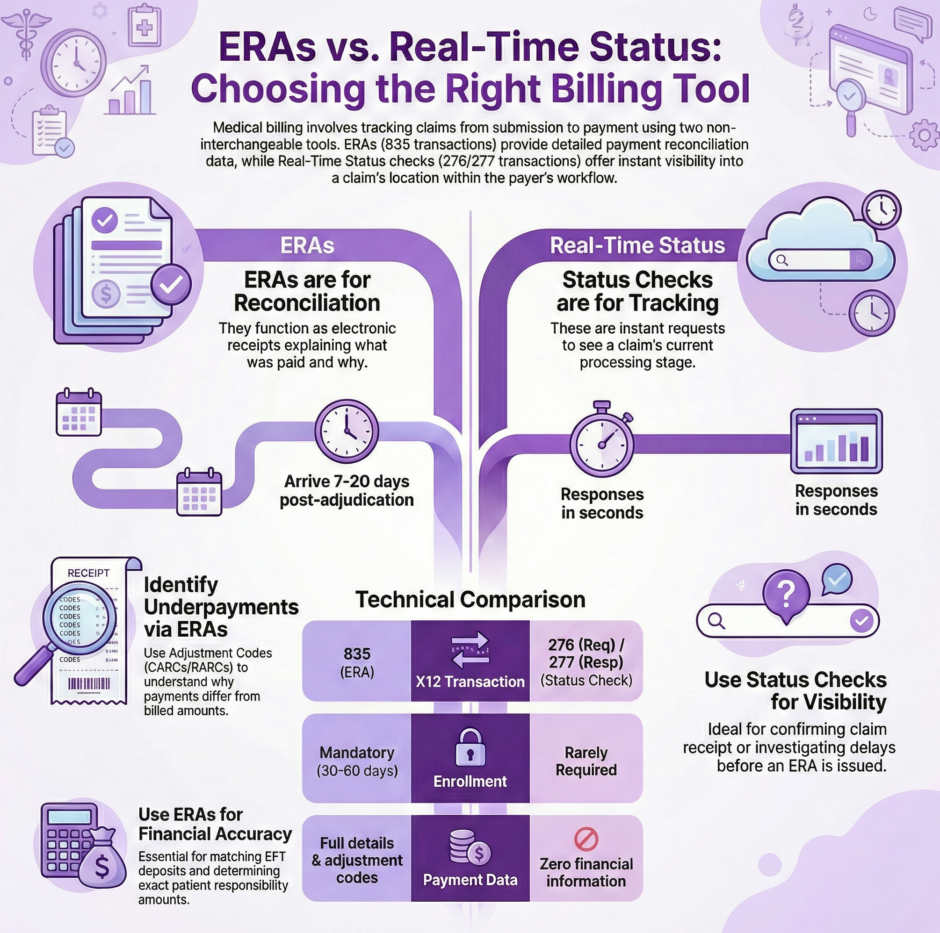
What is an Electronic Remittance Advice (ERA)?
An ERA functions as the electronic receipt for one or more claims. It tells you what a payer actually paid and why they paid that specific amount. Think of it as the electronic version of an Explanation of Benefits (EOB) or Explanation of Payment (EOP) that patients receive in the mail.
ERAs contain detailed payment information that goes far beyond simple claim status. They show exact payment amounts, check or Electronic Funds Transfer (EFT) numbers, patient responsibility amounts including copays and deductibles, and specific adjustment codes explaining any difference between what you billed and what the payer approved.
The timing matters enormously. ERAs only arrive after the payer has adjudicated your claim, which means they’ve reviewed it, made payment decisions, and issued payment. This typically happens 7-20 business days after you submit a claim, though it can take longer depending on the payer and claim type.
Here’s what makes ERAs unique:
- ERAs connect to payments, not individual claims. One ERA might include information for multiple claims paid in the same batch.
- A single claim can appear across multiple ERAs if the payer pays it in installments or makes adjustments after initial payment.
- Not every ERA maps directly to a claim you submitted. Payers also use ERAs for bonus payments, quality incentives, or value-based care adjustments.
The primary use case for ERAs is payment reconciliation. This is the accounting process where you match payments received to specific claims in your system, apply patient responsibility amounts correctly, and ensure your books accurately reflect what the payer paid.
What is a Real-Time Claim Status Check?
 A real-time claim status check is exactly what it sounds like: a request you send to a payer asking “what’s the current status of this claim?” The response comes back in seconds rather than days or weeks.
Conceptually, it replaces the phone call you used to make to insurance companies asking where your claim stands. Instead of waiting on hold for 15 minutes to speak with a representative who may or may not have current information, you get an instant electronic response showing the claim’s current position in the payer’s processing workflow.
To run a status check, you provide identifying information like patient details, provider identifiers, dates of service, and sometimes the claim amount. The payer’s system searches for matching claims and returns status information for whatever it finds.
The response tells you whether the claim has been received, is pending review, has been denied, or has been paid. You might get statuses for multiple claims if your search criteria match more than one claim in the payer’s system.
Real-time status checks don’t provide payment details, adjustment codes, or financial information. They simply tell you where the claim stands in the processing pipeline. This makes them perfect for tracking claim progress but useless for payment reconciliation.
Key Differences at a Glance
Understanding the core differences helps you know which tool to reach for when you need specific information:
- Purpose: ERAs exist for payment reconciliation, matching what you received to what you billed. Status checks exist for claim tracking and visibility into processing status.
- Timing: ERAs arrive only after adjudication is complete, typically 7-20 business days after submission. Status checks can be run anytime after claim submission, even within hours of sending the claim.
- Speed: ERAs are asynchronous, meaning payers send them when they’re ready, not when you request them. Status checks are synchronous, providing responses within 1-5 seconds of your request.
- Payment Information: ERAs contain complete payment details including amounts paid, check numbers, EFT information, and patient responsibility. Status checks contain zero payment information.
- Detail Level: ERAs provide line-item-level information with adjustment codes for each service. Status checks typically provide only claim-level status with no line-item detail.
- Enrollment Requirements: ERAs always require transaction enrollment with the payer, and you can only receive ERAs through one clearinghouse at a time. Status checks rarely require enrollment, and you can check status through multiple clearinghouses simultaneously.
Information Provided by ERAs
 ERAs deliver rich detail about how claims were adjudicated and paid. This information is critical for proper revenue cycle management and financial reconciliation.
Claim Adjustment Reason Codes (CARCs) appear throughout ERAs, explaining why service lines or entire claims were adjusted. These codes tell you specifically why you received less than billed amounts. For instance, CARC 161 indicates a provider performance bonus, while CARC B12 flags services not documented in medical records.
Remittance Advice Remark Codes (RARCs) provide additional context beyond the basic adjustment reason. If a CARC says documentation is missing, the RARC might specify exactly what documentation is needed, like “missing pathology report.”
Both claim-level and service line-level adjustment codes appear in ERAs. You might see one adjustment code explaining why the total claim payment was reduced, and then different codes for individual services within that claim showing which specific services were adjusted and why.
Financial details in ERAs support your accounting processes. The ERA shows the payment issue date, payment method (check or EFT), total provider payment amount, credit or debit flag, and check or EFT trace numbers for matching payments to bank deposits.
For EFT payments, the ERA contains the reference number your bank will show on your deposit. This lets you match ERAs to actual funds received, closing the loop on your accounts receivable.
Patient responsibility information appears at both claim and service line levels. ERAs show copay amounts, deductible amounts applied to the claim, coinsurance percentages and amounts, and any amounts the patient owes beyond insurance payment.
This patient responsibility data helps your billing staff know exactly what to collect from patients. It also identifies situations where you may have collected too much upfront and owe the patient a refund.
Information Provided by Status Checks
Real-time status checks provide simpler information focused entirely on where the claim currently stands in the payer’s workflow.
Status category codes give you the broad picture of claim status. Common categories include accepted, rejected, pending, finalized/payment, or acknowledged/forwarded. These codes tell you which stage of processing the claim has reached.
Claim status codes drill down with more specific information within each category. While a category code might say “pending,” the status code explains why it’s pending: waiting for additional information, under review, or held for investigation. For denied or rejected claims, status codes often indicate the specific reason.
Entity identifier codes sometimes accompany status codes, telling you who or what the status relates to. This might indicate whether the issue is with the provider, patient, payer, or some other entity in the claim process.
Together, these codes paint a clear picture of claim position without providing any payment detail. For example, you might learn a claim was finalized and paid, but the status check won’t tell you how much was paid or what adjustments were made.
Most payers provide only claim-level status in status check responses. While the X12 format supports line-item-level status, few payers actually return that level of detail. You get overall claim status but not individual service line statuses.
Status checks never include adjustment reason codes, denial explanations, or payment amounts, even for fully adjudicated claims. That information only comes through the ERA. If you need to know why a claim was denied or adjusted, the status check won’t help. You need the ERA.
When to Use ERAs
 Use ERAs for any task involving payment reconciliation or financial accuracy. This includes matching payments to claims in your accounting system, identifying why payments differed from billed amounts, determining patient responsibility amounts to collect, reconciling EFT deposits to specific claims, and auditing whether claims were paid correctly.
ERAs are your definitive source for what actually happened financially with a claim. When you’re entering payment information into your practice management system, recording patient balances, or investigating underpayments, you’re working with ERA data.
If you’re trying to figure out why you received $120 instead of the $150 you billed, the ERA will tell you. Maybe the contracted rate is lower, maybe the service was bundled with another procedure, or maybe the payer required additional documentation you didn’t provide. The ERA’s adjustment codes explain exactly what happened.
ERAs also help identify billing errors or opportunities to appeal incorrect payments. If you see a denial code that doesn’t make sense given your documentation, the ERA gives you the specific reason code to reference in your appeal.
When to Use Status Checks
Run status checks when you need to track claim progress or confirm claim receipt. Common scenarios include checking whether a payer received your claim after submission, investigating why you haven’t received an ERA within the expected timeframe, confirming a claim hasn’t been rejected before the payer sends an acknowledgment, monitoring claims approaching timely filing deadlines, and responding to patient inquiries about claim status.
Status checks work particularly well for claims that seem to be taking longer than normal. If you submit a claim and don’t receive an ERA within 21 days, run a status check to see if the payer even has the claim in their system.
They’re also useful when patients call asking about their claims. You can immediately check status and give them current information rather than saying “we submitted it, we’re waiting to hear back.”
For practices managing large claim volumes, automated status checking can flag problem claims early. If a claim is sitting in pending status for weeks, you might need to follow up with additional documentation or call the payer directly.
Transaction Enrollment Requirements

Transaction enrollment is the registration process that allows providers to exchange specific types of electronic transactions with payers. The enrollment requirements differ significantly between ERAs and status checks.
For ERAs, enrollment is always mandatory. Payers only send ERAs to the specific clearinghouse you’ve enrolled to receive them through. You must enroll separately with each payer to receive ERAs. Once enrolled with a payer through one clearinghouse, you cannot receive those ERAs through any other clearinghouse simultaneously.
This exclusivity means if you switch clearinghouses or use multiple clearinghouses, you need to carefully manage which clearinghouse receives ERAs from which payers. Having ERAs split across multiple clearinghouses complicates reconciliation.
The enrollment process for ERAs typically takes 30-60 days per payer. Some payers move faster, others take longer. You need to complete enrollment before your first claim submission if you want ERAs for those early claims.
For status checks, enrollment is rarely required. Most payers allow status checking without any enrollment process. You can simply start running status checks as soon as you have claims to track.
The few payers that do require enrollment for status checks typically have simpler, faster processes than ERA enrollment. Additionally, you can run status checks through multiple clearinghouses simultaneously. There’s no exclusivity restriction like with ERAs.
Technical Processing Differences
The technical processing for ERAs and status checks works completely differently, reflecting their different purposes and use cases.
ERAs arrive asynchronously. You don’t request them; payers send them automatically after adjudication. Your system needs to be set up to receive and process ERAs whenever they arrive. This might involve webhooks that notify your system when an ERA arrives, SFTP connections that let you download ERA files periodically, or API calls that retrieve ERAs from your clearinghouse’s storage.
Because ERAs arrive on the payer’s schedule, not yours, you need systems that can handle them coming in at any time. Large practices might receive dozens or hundreds of ERAs daily across different payers and different processing times.
Status checks work synchronously. You send a request and immediately get a response. This makes them perfect for real-time workflows like patient service representatives checking claim status during phone calls with patients. The synchronous nature means you control exactly when status checks happen. You can check status for specific claims when needed rather than waiting for information to arrive automatically.
Most modern clearinghouses offer multiple ways to access both ERAs and status checks. APIs let you integrate them directly into your practice management system. Web portals let staff check status or download ERAs manually. SFTP connections work well for batching processes where you download ERA files and status check results in bulk.
Correlating ERAs and Status Checks to Claims

Both ERAs and status check responses need to be matched back to the original claims in your system. This matching process relies on specific identifiers that link everything together.
The Patient Control Number (PCN) serves as the primary identifier for tracking claims from submission through payment. You assign the PCN when creating the claim, and it follows that claim through all subsequent transactions.
When you receive an ERA, it references the PCN from the original claim. When you get a status check response, it also references the PCN. This lets you match ERAs and status information back to the right claims in your system.
Without proper PCN management, correlating ERAs and status checks becomes nearly impossible. Make sure your PCNs are unique, consistently formatted, and properly stored with each claim record.
Some practices use additional identifiers like internal claim IDs or patient account numbers to help with matching. However, the PCN remains the standard identifier that appears in all electronic transactions.
X12 Transaction Sets Explained
Healthcare transactions use standardized formats called X12 EDI (Electronic Data Interchange). Understanding these formats helps when you’re working with clearinghouses or troubleshooting processing issues.
ERAs use the 835 Healthcare Claim Payment/Advice transaction set. When people refer to “835s” in healthcare billing, they’re talking about ERAs. This transaction set has a specific structure defining how payment information, adjustment codes, and other ERA data should be formatted.
Status checks use two transaction sets. The 276 Claim Status Request for what you send to payers, and the 277 Status Request Response for what comes back. Again, you’ll hear people refer to these by number: “send a 276” means run a status check, “the 277 response” means the status check result.
Note that claim acknowledgments also use a 277 transaction set, but it’s a different implementation called 277CA. Don’t confuse claim acknowledgments (which payers send automatically when they receive claims) with claim status responses (which you request by running status checks).
Most modern billing systems and clearinghouses shield you from direct interaction with X12 formats. They translate between user-friendly interfaces and the underlying X12 transactions. However, knowing the transaction set numbers helps when communicating with clearinghouses or reviewing transaction logs.
Practical Workflow Examples
Scenario 1: Payment Reconciliation
You receive a $500 EFT deposit in your bank account. Your bank statement shows an EFT trace number. You retrieve ERAs from your clearinghouse and find the one matching that trace number. The ERA shows it covers three claims, with specific payment amounts for each. You post these payments in your practice management system, matching each ERA line item to the corresponding claim. The ERA also shows patient responsibility amounts of $75 across the three claims, which you add to patient statements. In this workflow, the ERA provides all the payment detail you need. A status check would be useless here because you need financial information, not just claim status.
Scenario 2: Delayed Claim Follow-Up
You submitted a claim 25 days ago and haven’t received an ERA. You run a real-time status check using the patient name, date of service, and provider NPI. The status check returns showing the claim is “pending, additional information requested.” You call the payer, discover they need additional documentation, and fax it over. Two days later, you run another status check confirming the claim is now “approved for payment.” The ERA arrives three days after that with payment details. Here, status checks gave you the tracking information you needed to identify and resolve the problem. The ERA came later with payment details.
Scenario 3: Patient Inquiry
A patient calls asking about their claim status from last week. You run a real-time status check and see the claim is “approved for payment.” You tell the patient their claim is approved and they should receive their Explanation of Benefits soon. You check again the next week, find the ERA has arrived, and can tell the patient exactly what was paid and what they owe.
Status checks answered the immediate question about claim progress. The ERA provided the financial details the patient would eventually ask about.
Summary: Choosing the Right Tool
 ERAs and real-time claim status checks both play critical roles in medical billing, but they serve completely different purposes. ERAs provide detailed payment and adjustment information essential for accounting and reconciliation. Status checks provide claim tracking information essential for monitoring workflow and resolving problems.
Use ERAs when you need to know what was paid, why amounts were adjusted, or what patients owe. Use status checks when you need to know where a claim stands in the processing pipeline or confirm a claim was received.
Don’t wait for ERAs when you just need to check if a claim was received. Don’t expect status checks to tell you payment amounts or adjustment reasons. Use each tool for its designed purpose, and your revenue cycle will run more smoothly.
At Medwave, we handle billing, credentialing, and payer contracting for healthcare practices nationwide. Our billing team uses both ERAs and real-time status checks strategically to maximize revenue collection and minimize payment delays. We monitor claim status proactively, catching problems before they affect your revenue. We reconcile ERAs accurately, ensuring every dollar you’re owed gets properly posted and every patient balance is billed correctly.
If you’re struggling with ERA processing and need better claim status visibility, or want to optimize your entire revenue cycle, Medwave brings the expertise and systems to get it done right. Contact us today to learn how we can improve your practice’s financial performance.